A costume plot—also called an Actor/Scene Chart—is the master scene-by-scene tracking document built by the costume designer to map every actor, character, garment piece, and wardrobe change across a production. Plotting performers against scenes reveals double-cast overlaps, layered add-ons, and tight backstage quick changes long before technical rehearsals begin.
Where our parent overview on how costume design carries a character examines how silhouette, color, and cloth establish narrative identity, and our costume design process guide from script breakdown to fittings covers sketching, swatching, draping, and archival storage, this page focuses strictly on the costume plot itself: its matrix structure, worked examples, quick-change timing workflow, companion paperwork boundaries, and spreadsheet architecture.
| Core Costume Plot Dimension | What the Matrix Records | Operational Failure Prevented |
|---|---|---|
| Actor & Character Axis | Performer name paired with every role played, including double-cast assignments | Hiding impossible back-to-back changes when one actor switches characters between consecutive scenes |
| Act, Scene & Page Axis | Scene number, scene description, starting page, and ending page from the script | Listing garments by character without timeline order, which conceals short offstage intervals |
| Garment & Layer Specification | Complete outfit pieces plus explicit add-on or remove-layer cues from the prior scene | Missing underlayers, footwear, or accessories during fittings and dress rehearsals |
| Change Type & Wing Location | Normal dressing-room change versus backstage quick change, plus exit and re-entrance locations | Discovering during tech week that an actor exits stage right and re-enters stage left with no preset booth |
| Continuity & Condition State | Story day, time of day, and scripted tears, dirt, or progressive wear across scenes | Shooting scenes out of narrative order with mismatched collar, cuff, or garment damage states |
What is a costume plot in theatre and film production?
In theatre and film production, a costume plot is a comprehensive breakdown of costumes for each character and actor that tracks every garment piece and wardrobe change across the entire script. Produced by the costume designer, it serves stage management during technical rehearsals and anchors daily wardrobe check-in and check-out.
In academic and professional stage practice documented by the Indiana University South Bend Costume Design and Technology Handbook, this document is explicitly titled the Actor/Scene Chart (also called a costume plot). The Davidson College Stage Management Handbook defines it from two complementary angles: as a breakdown of costumes for each character that tracks all changes throughout the play, and as a comprehensive list of costume pieces for each actor generated by the costume designer that the Assistant Stage Manager should have a copy of and be familiar with.
Because staging, blocking, and design choices shift continuously across rehearsals, production handbooks stress one simple version-control rule: every new draft of the costume plot should be dated. In the Jacksonville State University Theatre and Film Production Handbook, the costume designer also maintains this wardrobe plot so garments can be checked in and out systematically each day of rehearsals and performances.
How film and television productions adapt the costume plot
On film and television shoots, scenes are rarely filmed in narrative order, so the costume plot integrates directly with two screen-specific documents: the First Assistant Director’s script breakdown and the script supervisor’s continuity paperwork.
During pre-production, the First Assistant Director reduces every screenplay production element into department lists that form the foundation of the production board, shooting schedule, and production budget. Under standard film breakdown marking rules, Wardrobe elements are marked with a Circle to flag both the specific costumes needed in each scene and continuity requirements whenever a garment gets ripped up or dirtied during the story.
Modern film offices digitize this tagging in Final Draft Tagger or Movie Magic Screenwriter and import the resulting lists into scheduling software such as Gorilla Scheduling, Movie Magic Scheduling, or Yamdu. Meanwhile, the script supervisor creates a pre-production one-line continuity synopsis listing the time of day, day in story order, and a one-line scene summary so production, wardrobe, set dressing, hair, and makeup remain synchronized across non-linear filming days. Once cameras roll, the Set Costumer stands by on set to watch performers, fix minor tears, and adjust details such as shirt collars while the script supervisor coordinates continuity across every department.
What does a completed costume plot example include?
A completed costume plot example pairs performer and character rows against sequential act, scene, and script page columns, showing each full outfit alongside add-or-remove layer changes, exit and re-entrance wings, quick-change flags, and continuity notes. Reading across a row exposes every transition one actor must physically complete.
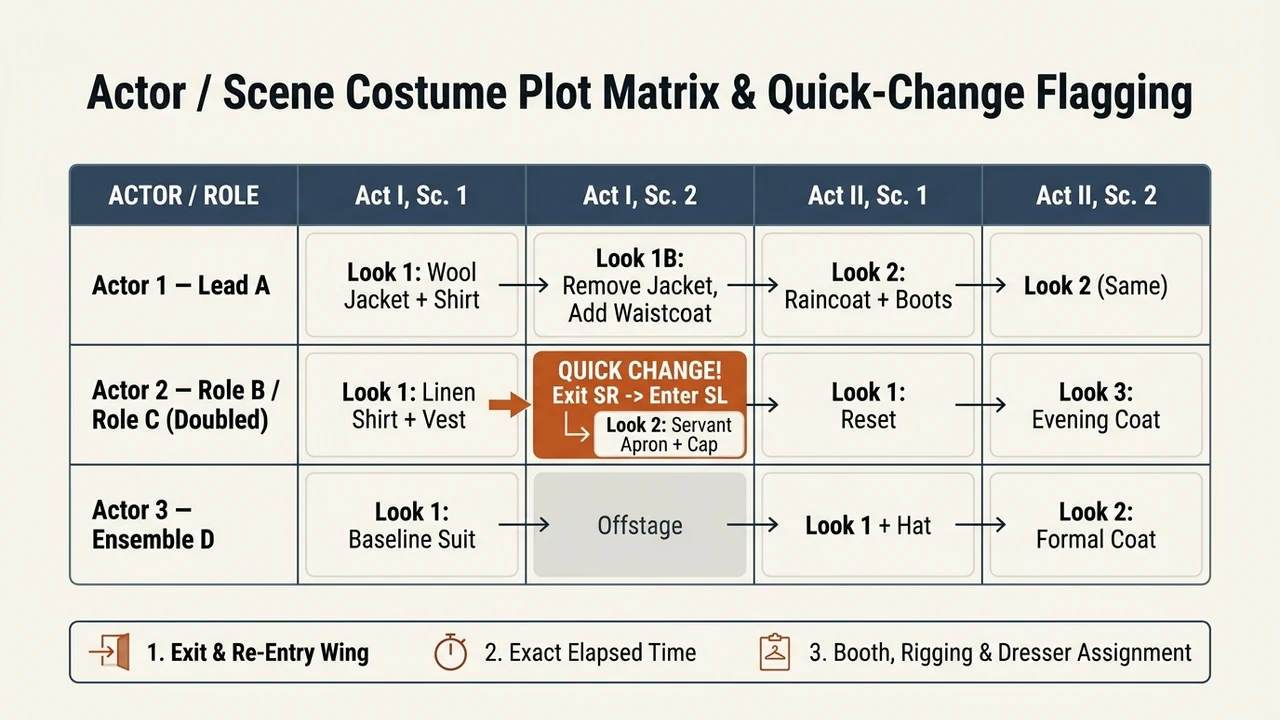
Listing garments solely by character without a chronological scene grid is the single most common breakdown failure. When a list omits scene order, teams frequently miss that one actor playing two roles exits at the end of one scene and re-enters moments later in a different outfit, or that a character only removes an overcoat rather than changing base layers.
The worked costume plot example below illustrates how a stage or screen wardrobe team organizes actor rows, scene progression, garment layers, transition locations, and continuity conditions on one unified reference grid:
| Actor & Character(s) | Act / Scene & Story Order | Scripted Base Look & Accessories | Layer Delta from Prior Scene | Change Type & Wing Location | Continuity / Shop Note |
|---|---|---|---|---|---|
| Actor A — Lead Role | Act I, Scene A (Story Day One, Morning) | Wool jacket, linen shirt, tailored trousers, leather shoes | Baseline preset before curtain | Dressing-room preset | Pull and fit shoes first for rehearsal blocking |
| Actor A — Lead Role | Act I, Scene B (Story Day One, Evening) | Linen shirt, tailored trousers, evening waistcoat, leather shoes | Remove wool jacket; add evening waistcoat | Offstage wing swap | Keep wool jacket on labeled wing hook for reset |
| Actor B — Clerk / Servant (Doubled) | Act I, Scene A (Story Day One, Morning) | Linen shirt, utility vest, dark trousers, work boots | Baseline preset before curtain | Dressing-room preset | Confirm base shirt and trousers work under both roles |
| Actor B — Clerk / Servant (Doubled) | Act I, Scene B (Story Day One, Evening) | Linen shirt, servant apron, cap, dark trousers, work boots | Remove utility vest; add servant apron and cap | Flagged quick change: exit stage right, enter stage left | Verify elapsed time on En/Ex plot; assess booth and dresser |
| Actor C — Traveler | Act II, Scene A (Story Day Two, Exterior) | Canvas coat, cotton shirt, heavy trousers, laced boots | Full look change during intermission | Normal dressing-room change | Continuity circle tag: coat sleeve torn and dirtied onstage |
| Actor C — Traveler | Act II, Scene B (Story Day Two, Interior) | Cotton shirt, heavy trousers, laced boots (coat removed) | Remove soiled canvas coat; retain torn cuff state | Offstage preset table | Match dirtied shirt state across consecutive runs or non-linear takes |
Why actor rows, layer deltas, and dated drafts matter
Separating Actor from Character prevents silent scheduling collisions in ensemble shows where performers double or triple roles. Grouping every role played by the same performer into one horizontal band forces the costume designer and Assistant Stage Manager to inspect consecutive scene columns together.
Recording explicit layer deltas—such as removing a jacket and adding a waistcoat over an existing base shirt—also keeps the wardrobe crew from over-building unnecessary full changes. Because blocking and scene cuts shift during rehearsals, keeping a revision date header on every exported sheet ensures the shop, stage management, and dressers always work from the same version.
How does a costume plot differ from a piece list, dressing sheet, or quick-change plot?
The costume plot serves as the central Actor/Scene Chart linking performers to scenes, whereas companion documents isolate sourcing, inventory, timing, and backstage execution. Separating the Costume List, Preliminary Piece List, Entrance/Exit Plot, Quick-Change Plot, and Dressing or Tracking Sheets prevents one overcrowded spreadsheet from slowing down rehearsals.
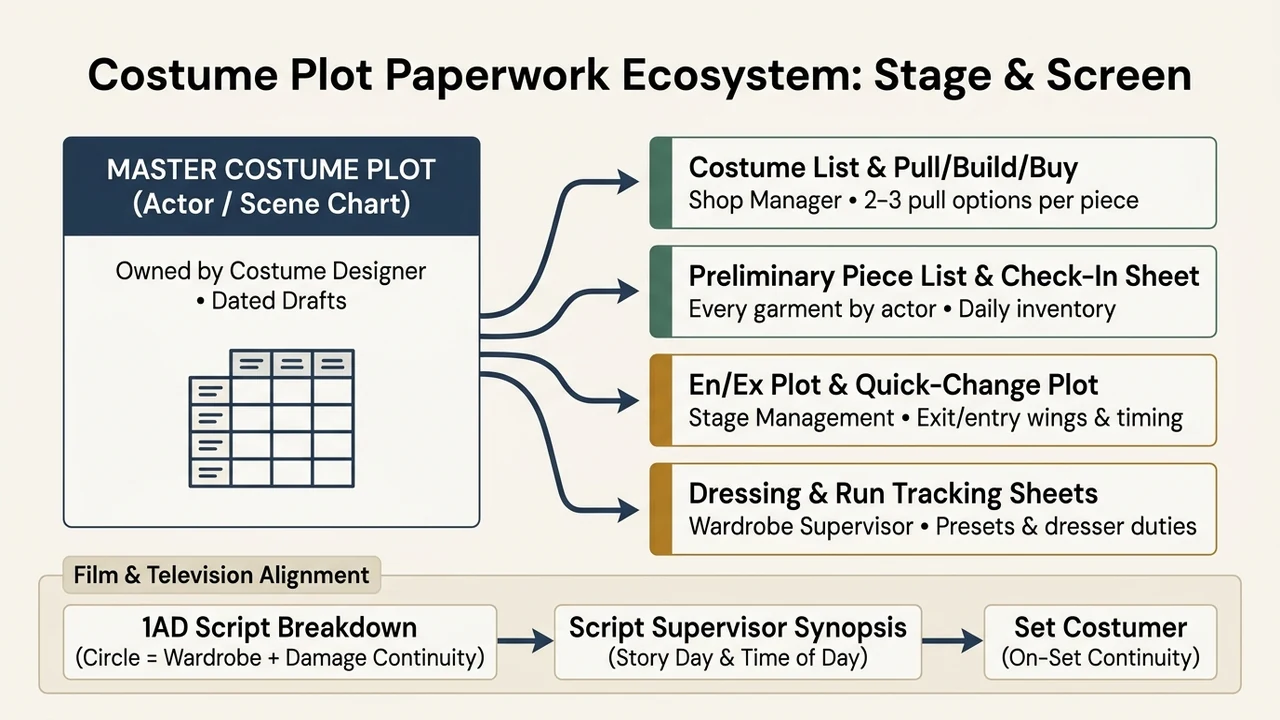
Under the pre-production package defined in the Indiana University South Bend handbook, the costume designer delivers six distinct elements to help the costume shop understand a production: approved costume sketches, visual research, the Actor/Scene Chart (costume plot), a Costume List enumerating all costumes in the show, a Preliminary Piece List dividing every article of clothing by actor, and a Quick Change list whenever transitions are tight.
Once rehearsals advance toward technical and dress weeks, stage management and wardrobe staff derive operational sheets from those design documents rather than editing the master plot directly. The table below maps each document’s owner, core columns, and handoff point:
| Paperwork Document | Primary Owner | What It Lists | When It Is Built & Used |
|---|---|---|---|
| Costume Plot (Actor/Scene Chart) | Costume Designer (shared copy to ASM and Wardrobe) | Characters, actors, scene appearances, looks per scene, and all wardrobe changes | Preliminary draft early in design; refined through tech and daily check-in |
| Costume List & Pull/Build/Buy List | Costume Designer & Costume Shop Manager | Every distinct costume in the show tagged as pulled from stock, built, or bought | Preliminary design review to lock shop labor, stock pulls, and purchases |
| Preliminary Piece List & Check-In Sheet | Costume Designer (derived into Check-In Sheet before dress) | Every individual clothing article divided by actor so pieces are checked in and out | Piece list delivered with designs; check-in sheet completed by the Wednesday before dress |
| Entrance/Exit (En/Ex) Plot | Stage Management (2nd ASM, updated copy to Costume Supervisor) | Act, scene, page, character, En or Ex flag, wing location, notes, next entrance, and offstage elapsed time | Drafted during rehearsals and finalized with Costume Supervisor during tech |
| Costume Quick Change Plot | Stage Management (ASM) & Costume Supervisor | Script page, what the actor changes out of and into, exit and re-entrance locations, and exact time available | Flagged by third week of rehearsal; timed and fine-tuned during tech and Tech Dress |
| Dressing Sheets & Run Tracking Sheets | Costume Designer (Dressing Sheets) & Wardrobe Supervisor / Crew (Tracking Sheets) | Actor dressing sequences plus crew preshow, performance, preset, and post-show duties | Dressing sheets ready Wednesday before dress; tracking sheets run live performances |
How do you build a costume plot from a script breakdown and schedule milestones?
Building a costume plot starts by extracting a Character/Scene Breakdown from the script—capturing scene number, scene description, starting page, ending page, and cast present—and layering garment decisions across fixed design and rehearsal milestones. Anchoring each draft to shop and rehearsal deadlines keeps sourcing, fittings, and backstage presets synchronized.
From Character/Scene Breakdown to pull rack and designers run
Per the Davidson College Stage Management Handbook, the Character/Scene Breakdown records five core fields for every scene: scene number, scene title or description, starting page, ending page, and who is in the scene. While the director and Production Stage Manager use that grid to build weekly rehearsal schedules, the costume designer uses the exact same scene map to determine how many looks each character needs and where consecutive appearances occur.
Once the preliminary costume plot and sketches are reviewed, the costume designer meets with the costume shop manager to separate garments that will be built from garments that will be pulled from existing stock. When pulling stock onto a possibility rack for actor fittings, the Indiana University South Bend handbook recommends pulling 2 to 3 options for each piece whenever possible so alternative fits can be tested immediately while the actor is in the fitting room.
Movement-critical pieces—especially shoes—are pulled and fitted first so they can be sent into rehearsals early for actors to practice using. During rehearsals, the costume designer attends the designers run to verify that garments currently in production satisfy every physical action onstage. After opening night, unused garments left on the pull rack are restocked into inventory.
Production milestone calendar for costume plot handoffs
University theatre and film handbooks establish a clear chain of deadlines connecting the preliminary costume plot to opening night. Mapping these milestones prevents last-minute quick-change surprises or missing check-in sheets:
| Production Milestone | Target Timing | Required Costume Plot Deliverable & Action |
|---|---|---|
| Second Design Draft | Week 8 | Preliminary costume plot due alongside sketches showing color indication and solutions for anticipated challenges |
| Preliminary Design Review | Week 9 | Detailed costume plot due for director approval alongside color sketches of built costumes, research images, and Pull/Build/Buy list |
| Final Design Submission | Final design lock | Finalized Detailed Costume Plots delivered alongside full-color renderings with fabric swatches |
| Early Rehearsal Audit | By third week of rehearsal | Stage management and costume designer identify all possible quick changes and start the ASM quick-change list |
| Wardrobe Crew Handoff | One week prior to dress | Wardrobe Crew Head meets costume shop supervisor to collect crew list, costume plot, and quick-change plot for run planning |
| Pre-Dress Paperwork Freeze | Wednesday before dress begins | Costume designer finishes wardrobe check-in sheet (from piece list) and dressing sheets to allow time for copying |
| Tech Dress | Scheduled at first production meeting | Full tech run with all costumes completed and all quick changes working (without wigs or makeup) |
| First Dress Rehearsal | Three days before opening | Non-stop run under show conditions; crew note routine wardrobe problems for post-run fixes and halt only for safety concerns |
| Performance Pre-Show Preset | 2 hours before places called | 1st ASM arrives 2 hours before places, leaving 1 ½ hours for backstage presetting before the half-hour call; wardrobe presets offstage and onstage pieces |
How do you flag and time backstage quick changes using a costume plot and En/Ex plot?
Flagging quick changes requires cross-referencing the costume plot against stage management’s Entrance/Exit (En/Ex) Plot to measure the exact offstage interval between an actor’s exit and next entrance. Because there is no hard-and-fast second threshold for what counts as a quick change, every tight transition is judged by garment complexity and show pace.
As the Davidson College handbook explains, a quick change is any costume change occurring in too short a period for the actor to return to the dressing room. A span that looks generous on the printed script page can shrink drastically once actors move at full performance pace or wrestle with footwear and fasteners.
By the third week of rehearsal, stage management and the costume designer review the script together to flag possible quick changes. The Assistant Stage Manager builds a dedicated Costume Quick Change Plot from the costume plot, capturing four core details for every flagged transition:
- Script page of the change: Pinpoints where the transition begins in the calling script.
- Target garments (out of and into): Outlines exactly which pieces come off and which pieces go on.
- Exit and re-entrance locations: Notes the specific wing or stage side where the actor exits and where the actor re-enters.
- Exact elapsed offstage time: Measures the real interval between the character’s exit and next entrance.
Those four data points directly control three backstage engineering decisions: whether a quick-change booth is needed and where to place it, how garments must be rigged to execute the swap reliably, and whether a backstage dresser must be assigned to assist the actor.
Connecting the Entrance/Exit (En/Ex) Plot to quick-change timing
Under the Emerson Stage Stage Manager’s Handbook, the 2nd ASM builds an Entrance/Exit Plot logging every character entrance and exit across the show. Each line includes act, scene, page, character, En or Ex flag, stage location, notes (which can be split into Costumes and Props sub-columns to detail what performers wear and carry), and—for every exit—the next entrance plus the elapsed time between exit and re-entrance.
| Act / Scene & Page | Character & Actor | En / Ex | Wing Location | Next Entrance & Offstage Window | Costume Notes (Out Of / Into) | Props Carried | Booth, Rigging & Dresser Decision |
|---|---|---|---|---|---|---|---|
| Act I, Scene A (Exit) | Clerk / Servant (Actor B) | Ex | Stage Right | Act I, Scene B (Stage Left); tight offstage crossing | Out of utility vest; keep linen shirt and trousers on | Ledger book dropped on Stage Right prop table | Cross behind backdrop; preset servant apron and cap in Stage Left quick-change area |
| Act I, Scene B (Enter) | Clerk / Servant (Actor B) | En | Stage Left | Stays onstage through scene end | Into servant apron and cap over baseline shirt | Silver tray picked up from Stage Left prop table | Assign backstage dresser at Stage Left wing; check fastening rig during Tech Dress |
| Act I, Scene B (Exit) | Lead Role (Actor A) | Ex | Stage Left | Act II, Scene A (Stage Right); full intermission | Out of evening waistcoat; reset wool jacket | None carried | Normal dressing-room change; no backstage booth required |
Tech week timing, non-stop dress runs, and post-show checks
During technical rehearsals, stage management sends the most updated copy of the Entrance/Exit Plot to the Costume Supervisor so wardrobe knows every tight transition, then works directly with the Costume Supervisor to time out and fine-tune each quick change. Before performers enter dressing rooms, Stage Management and Wardrobe coordinate dressing-room assignments (separated by gender and further by role where helpful) and post actor name-tag labels at each dressing spot and on wardrobe items.
Before curtain, wardrobe crew ensure all pieces are cleaned, steamed or ironed as directed, preset offstage quick-change pieces, and preset any onstage costumes. Once the production enters dress rehearsals, runs do not stop for routine wardrobe glitches; crew write down issues to resolve afterward unless a safety concern demands an immediate halt. After each performance, the Stage Manager checks in directly with the Wardrobe Supervisor to log ripped costumes, broken jewelry, or any quick change that did not run smoothly.
How do you structure a costume plot template in Excel or Google Sheets?
Structure a costume plot workbook in Excel or Google Sheets as four linked tabs rather than a single wide table: a dated Master Actor/Scene Matrix, a Preliminary Piece List and Daily Check-In tab, an En/Ex and Quick-Change Log, and a Pull/Build/Buy and Continuity Tracker. Separating views keeps designers, stage managers, and dressers working from one synchronized file.
Keeping all four views in one shared workbook eliminates retyping errors between pre-production and tech week. Use the tab and column schema below—drawn directly from verified theatre and film production paperwork fields—to build a reusable template for either stage runs or multi-day screen shoots:
| Workbook Tab | Required Column Headers | Primary Users | Key Maintenance Rule |
|---|---|---|---|
| Tab A: Master Costume Plot (Actor/Scene Matrix) | Draft Date, Actor Name, Character Name(s), Act, Scene Number, Scene Description, Start Page, End Page, Story Day & Time of Day, Look Name, Layer Delta, Quick-Change Flag | Costume Designer, Director, Stage Management | Freeze actor and character columns on the left; update the draft date header on every revision |
| Tab B: Preliminary Piece List & Daily Check-In | Actor Name, Character, Look Name, Garment Article (Base, Layer, Footwear, Accessory), Name-Tag Label Status, Daily Check-Out, Daily Check-In, Laundry / Steam Note | Costume Designer, Wardrobe Crew Head, Dressers | Complete check-in and dressing sheets by the Wednesday before dress rehearsals for copying |
| Tab C: En/Ex & Quick-Change Log | Act, Scene, Script Page, Character & Actor, En or Ex, Wing Location, Next Entrance, Exact Elapsed Time, Changing Out Of, Changing Into, Props Carried, Booth / Rigging / Dresser Assignment | Assistant Stage Manager, Costume Supervisor, Dressers | Start by the third week of rehearsal; send updated En/Ex sheet to Costume Supervisor during tech |
| Tab D: Pull/Build/Buy & Continuity Tracker | Look Name, Garment Article, Source Path (Pull / Build / Buy), Pull-Rack Backup Count (2 to 3 options), Fitting Priority (Shoes First), Film Circle Continuity State (Clean / Ripped / Dirtied), Repair & Post-Show Note | Costume Shop Manager, Draper, Set Costumer, Script Supervisor | Sync Circle continuity tags with the Script Supervisor’s one-line synopsis; restock unused pull-rack items after opening |
Pre-tech costume plot verification checklist
Before handing the workbook to the Wardrobe Crew Head one week prior to dress rehearsals, run six quick checks across all tabs:
- Confirm every draft carries a current date: Verify that outdated copies are archived so stage management, the costume shop, and wardrobe never reference conflicting scene numbers.
- Audit every doubled actor row: Scan consecutive scene columns for every performer playing multiple roles to confirm no hidden back-to-back quick change was missed.
- Cross-check shoes and movement-critical pulls: Confirm footwear and structural movement garments—including stress-relieving details covered in our stage costume underarm gusset and breathable lining guide—were pulled, fitted first, and cleared at the designers run.
- Match piece lists to check-in and dressing sheets: Verify every item on the Preliminary Piece List appears on the actor’s check-in sheet, dressing sheet, and dressing-room name-tag labels by the Wednesday before dress.
- Verify offstage and onstage presets: Confirm every quick-change garment and onstage costume preset is assigned to a specific wardrobe crew member on the run tracking sheets.
- Align film continuity columns when shooting out of order: Confirm every circled Wardrobe continuity state (such as torn or dirtied garments) matches the Script Supervisor’s story-day synopsis before cameras roll.
Maintaining a disciplined costume plot connects early script analysis to calm, repeatable backstage execution across every production covered in our style section.